Double Exposed Portraits

Portrait photography is photography that involves the side of a persons face. It is focused on the persons face emotions. Portrait imagery is related to profile view in the aspect that both views feature the face details the most.

The first step to double exposure is loading a portrait image along with two to three other  images. Then on the portrait dodge everything around the face. After dodging the image right click on the picture in the layer bar and select Blending Options and then change your blend mode off of normal. Then do that to all of your pictures. The reason for making double exposures is to make normal pictures cool.


My first image is a picture of a tree. This symbolizes my love of nature and my adventures spirit.  The second picture is a view out side of the school. This represents two things. One, it represents that I like to take time and enjoy the view. Also, It represents that I spend a lot of time at school.


HDR Photography

HDR stands for high-dynamic-range imaging. It is a set of techniques used by photographers to capture a more detailed image with  a greater dynamic range. Its a good technique used to make a picture more detailed and vibrant. I like taking HDR images because they turn out better then normal pictures. They have more detail and have a lot of color in them.

The first step to creating an HDR photo is to find a great spot to take the image and making sure that you are taking the picture at the best time. Second is to take the several pictures needed by starting at -3 exposure and going up by one all the way up to +3 exposure. Next you have to upload the pictures to your computer. From there open up PS5.5 and Merge to HDR Pro. And fine tune your image in Camera Raw.

For my experiment image I chose to take it of my sister in her room. It was a little difficult because there wasn't enough light and when ever I tried to take the picture it would turn out really red and pink. In the end I was able to take good pictures and was able to make this.
I also did a landscape HDR image right outside of my school at dawn. The pictures turned out great with the sun rise in the background.


Movie Trailer Critique

This project was to make a movie trailer about a fake movie that we thought of. Our team had four people on it. The main character, Bill was played by Justice Chatfield, I played DJMax the cop, Sophia Rodriguez played Bills mother and Noa Harrison played Random Guy. Making the video wasn't the only thing we got graded on. Each team had make a trailer plan. The reason we made a trailer plan was to keep us organized and to make sure we knew what we were doing. The main thing I did in the team was acting. I was the second main character and I was in half the film. I also helped out with the editing and I did the voiceover too.
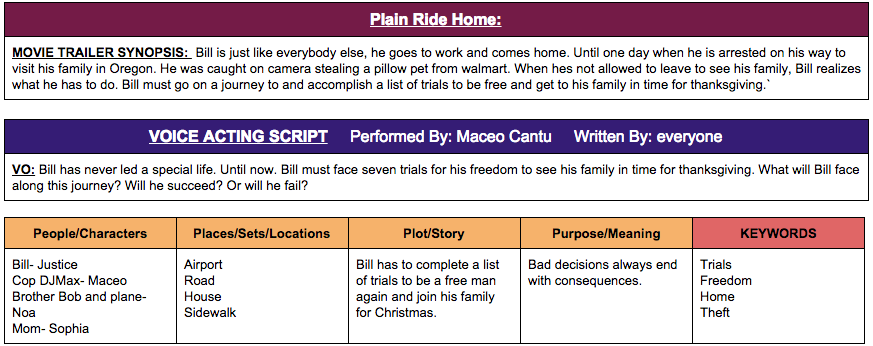
This project had a lot of portions to it. We needed a voice acting script, a voiceover, dialogue, foley, text layovers, the movie had to be between 1:30 to 2:30 minutes and we needed a movie poster. My team and I did complete all the requirements. We had enough time so we were able to go all the work.
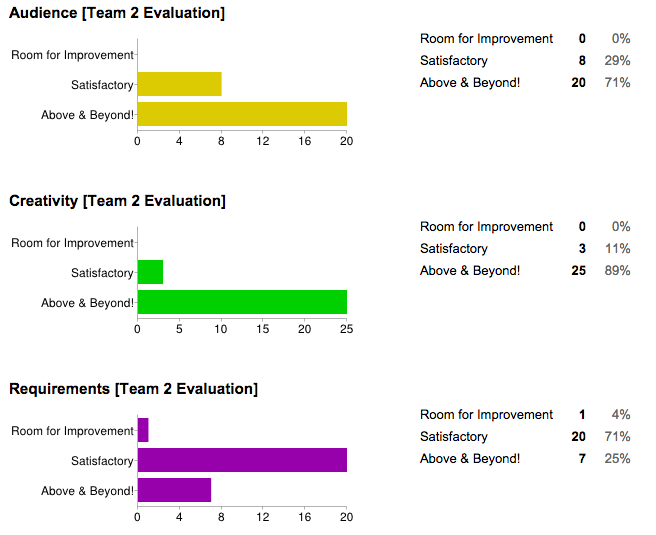
The way we critiqued the movie trailers was we watched each video and then scored then on three things. Audience, did you want to keep watching, creativity, how creative the video was, and requirements, did they meet all the requirements well. I was really happy when I saw the results and I agree with it. I was so happy when we had the best video. I learned a lot about editing because are video need a lot of it, and I learned a lot about green screens too.

Visual Literacy

This was a project for our new 7th period class. Our project was to make a word out of pages in a book. This style of art was created by Isaac Salazar. What we had to do first was find a word, then print out a layout of the word from Photoshop. From there we found a book big enough for our word and start folding. What we had to do was fold pages to match the layout of our word. This project was a great example of visual literacy because after it was done it showed a word that meant something to us and displayed it for many people to see.


The first book I did I put Pi. I did this word as a reference to math my favorite subject and to refer to pie my favorite food and word to say. The font that I chose looked really fancy. I also chose an old math textbook to display my word. This took me about two weeks to do and in this book I folded around 275 pages. After that one I made another book of a unicorn because their my favorite mythical creature. It took only about a week to do and I folded around 250 pages. I am also about to start on my third book. I think its going to take me a long time because I have to fold around 500 pages.


I think my two books turned out really well. The pie was my best I think. My table partner also made a unicorn as well and we put them side to side and it looks good too. If I could go back I would make my folds more exact. Well I'm starting on making the American flag and that hopefully is going to look good. But if I was to make another book it would be of a cool car or something like that. I would chose that because I like cool cars and it would be cool if I could make one in my book.

Movie Poster Promo

 What overall impact did the layer effects & filters you used have on your finished movie poster?


In our movie poster you will see the main character, Bill and the second primary character Cop DJMax. What I'm thinking of doing is showing Bill holding on to a cliff and having Cop DJMax above him on the cliff.  It represents all the tasks that bill has to go through. Its going to be positioned in an unusual angle with the camera looking up to Bill. Its going to make the movie look interesting and unusual.


The title of our movie is Plane Ride Home and it is the biggest text in the  poster. Also it states the actors, reviews and the date it comes out. To help make our text look good we use the kerning effects on it. Kerning is the process of changing the spacing between letters to make the text look how you want it. We use it to make our text look better an more pleasing.


Proactive or Procrastination?


I think I am procrastinating more than proactive. I think this because I'm more useful when we are filming and editing but not so much at typing. I think that i'm going to be doing a lot of filming though because thats usually the main thing I do in projects. I'm also hoping to do a lot of editing in this project.

I think I was more productive then fooling around. Although I had a lot of free time I also helped out a lot with the trailer plan. I'm also going to film a lot of B-roll for our intro and ending screen.  I will be in the video and be the camera man.

If I could change my work habitats I would make myself more productive. I would like to be able to work longer then I fool around but its a little hard for me. I fool around a lot and I'm not use to working a lot. But since we are doing a poster in photoshop I can help a lot with that. My work habits are most likely going to change later on in the project.

My Visual Poem


My poem is about water. It talks about how it helps us and is all around us. In the end it also talks about how we are affecting it. The visuals show water and nature. It also helps visually show what i'm talking about.

It may not seem like it but the effects really helped my visual story. I used the effects to make my film clearer and vibrant. I used the color tool in many shots to make it more colorful. I think without the effects my film wouldn't of looked as good as it dose.

I think that I did a good job on the poem. I was surprised that I was able to make a poem like that. One thing that I could of done better was add more B-roll. I also could of re-filmed the the voiceover. Another thingI could of done was make my poem longer.